AI / Infra
Using Claude Subscription Credits for the API
Which API paths the monthly credit covers on Max and Team plans, how to link an organization and manage keys, calls through the Python SDK, ant CLI, and Batch API, and how deduction and spend caps work
Claude Max and Team subscriptions include a monthly API credit. Whether your code can spend that credit depends on the path the call takes. The same model can draw on the credit through one path and count against the subscription usage limit through another.
This guide explains the principle that separates those paths, then walks through linking, key handling, and each call method step by step. The commands and responses are from runs on 2026-10-22. Prices and policy terms follow the official documentation as of 2026-10-23. Anthropic can change these terms, so check the source before you rely on them.
0. Terms used in this guide: API, ant CLI, and Managed Agents
Three terms appear throughout this guide. Here is what each means.
- API (Application Programming Interface): the HTTP interface a program uses to send requests to Claude and receive responses. You send a model name and messages as JSON to
https://api.anthropic.com/v1/messages, and you get a JSON response. Every call in this guide is an API call. Unlike chatting on claude.ai or using Claude Code, the API authenticates with an API key and bills by the number of tokens used. - ant CLI: Anthropic's official command-line tool. It lets you make the same API calls from a single terminal command, and its
--transformoption extracts only the value you need from a response. It is a convenience in place of building requests by hand with curl. Billing is the same as for the API. - Managed Agents: an API feature that runs an agent in a cloud sandbox that Anthropic manages. It is made of agents, environments, sessions, and events, and tool execution and file work happen on Anthropic's side. It is a beta feature, and within this guide's scope, the credit applies. A recorded first run is covered in A First Managed Agents Session.
Of the three, only Managed Agents runs in a different place. With the API and the ant CLI, you send a request and get a response back. With Managed Agents, you open a session and the work continues in an Anthropic sandbox.
1. How billing is structured
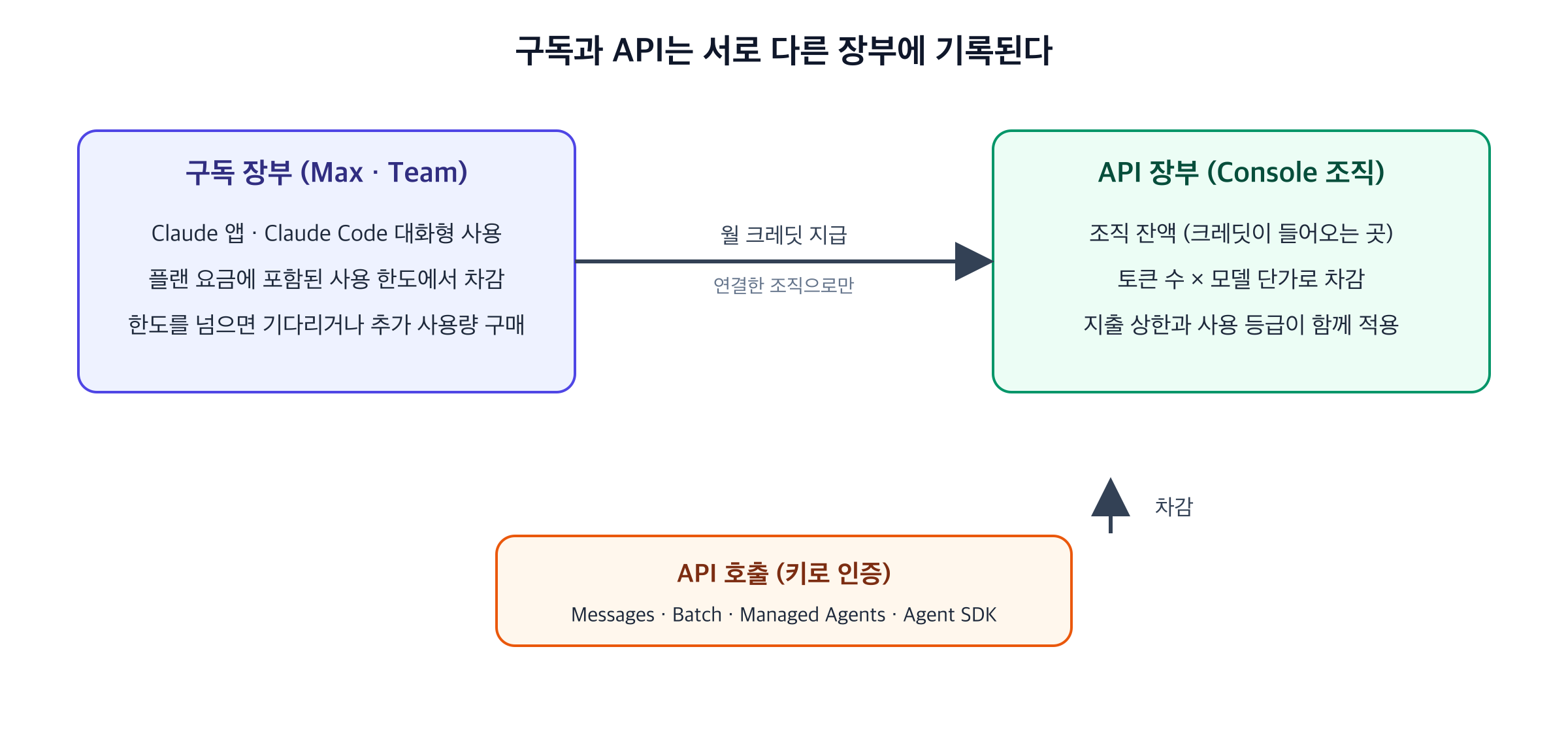
A Claude subscription and the API are two separate ledgers.
- Subscription usage limits cover the Claude apps and Claude Code. They are included in the plan price. When you hit the limit you wait or buy extra usage.
- API billing charges the tokens you send, multiplied by per-model prices. The billing unit is the organization. Every API key and workspace in the organization draws on the same balance.
The credit is the bridge between these ledgers. It moves the monthly amount granted by your subscription into your organization's API balance, and only API calls draw that balance down. So "the credit applies" means "this call is recorded in the API ledger." A call recorded in the subscription ledger does not touch the credit.
Anthropic's terms classify this credit as Promotional Credits, which are granted at no charge. The program can therefore change or end.
2. Which products are covered
The test is which ledger a call is recorded in. The documented list is:
| Product | Covered |
|---|---|
| Claude API (Messages, Batch, and others) | Yes |
| Claude Managed Agents | Yes |
| Claude Agent SDK | Yes |
| Console Playground | Yes |
| Claude Code (interactive) | No |
| Extra usage in the Claude apps | No |
| AWS, Bedrock, Google Cloud, Microsoft Foundry | No |
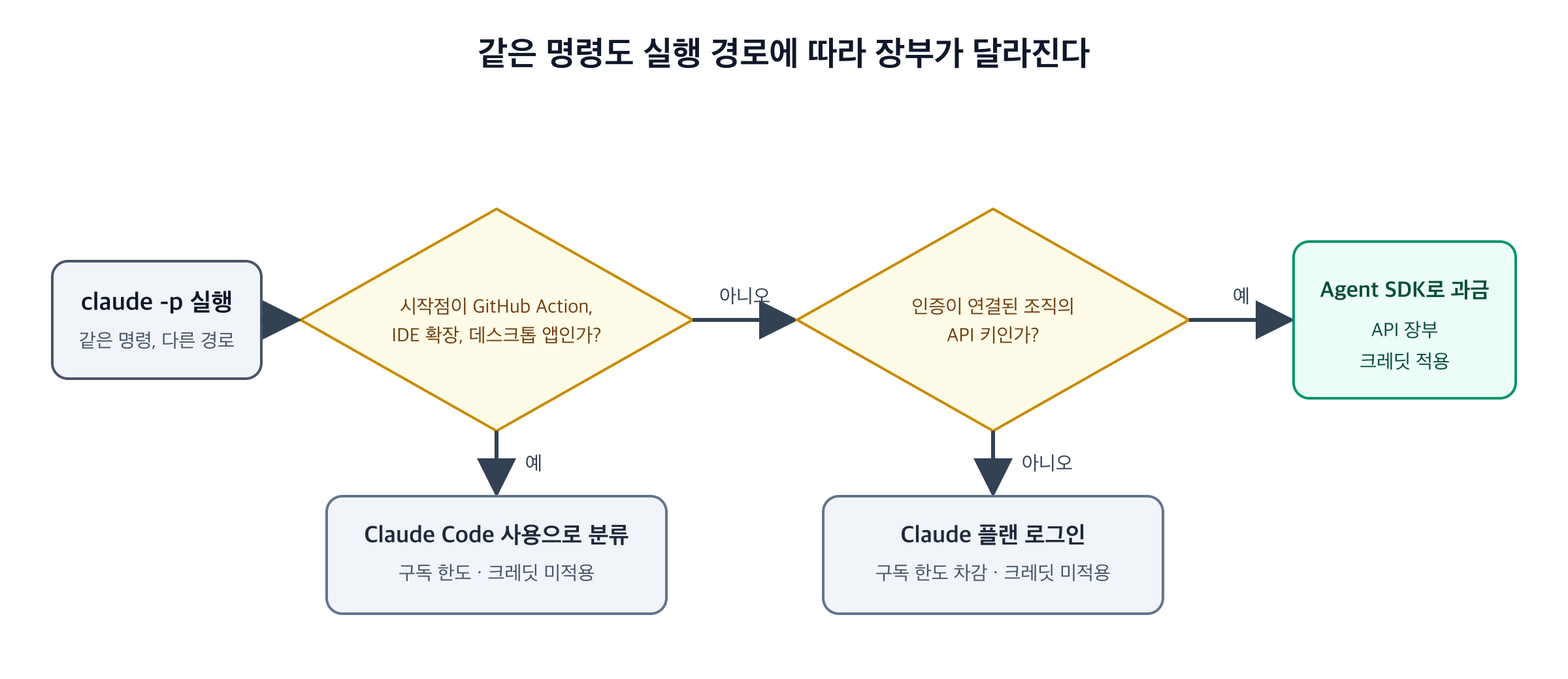
claude -p is the most confusing entry, because the same command can land in different ledgers depending on how it authenticates. Run with the API key of a linked organization, it is billed as Agent SDK usage, and the credit applies. Run while signed in with a Claude plan, it draws on the subscription usage limit. Runs started from GitHub Actions, an IDE extension, or the desktop app are classified as Claude Code usage even when the command is -p, so the credit does not apply.
In practice: a program that calls the API with a key is covered. A tool a person uses interactively is subscription usage.
3. The amounts
| Plan | Monthly credit |
|---|---|
| Max 5x | $100 |
| Max 20x | $200 |
| Team Standard seat | $20 per seat |
| Team Premium seat | $100 per seat |
A Team pools the credit from all seats into one balance and caps the monthly pool at $500. The amount is set by the number of seats when the billing month begins. For example, three Standard seats and two Premium seats give 3 × $20 + 2 × 260. Adding one Premium seat in the middle of a month takes effect in the next billing month, which makes it $360.
The API spend cap is separate from the credit amount. Each organization has a usage tier, and each tier has a monthly spend limit. According to the documentation, Start is 1,000, and Scale is 200. Tiers rise with usage. If you need a higher limit sooner, request a tier increase from the Rate limits page in the Console.
4. Linking the organization
Linking connects a subscription to a Console organization.
- Open billing settings on claude.ai. On Max, go to Settings > Billing. On Team, go to Organization settings > Billing.
- In the API credits section, choose the Console organization that should receive the credit and select Link organization. This accepts the Supplemental Credit Terms.
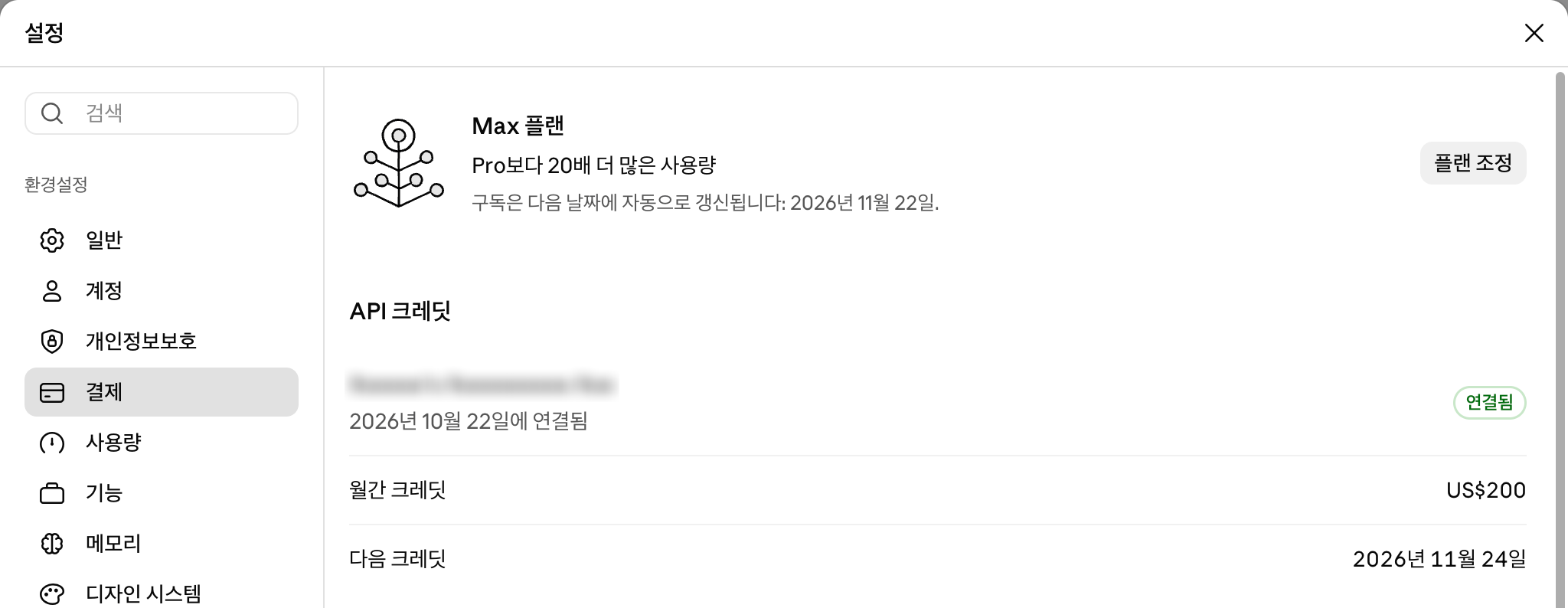
Once linked, the API credits section of the same billing page shows the linked organization, the date it was linked, the monthly credit, and the next grant date. The screenshot below is a Max account on 2026-10-27, shown in the Korean UI, with the organization name blurred.
The preconditions have reasons behind them. The plan must be active, and a new subscription must have been active for seven days. On Max, the person who links must be the subscriber. On Team, the person must be the Primary Owner or an Owner. In the Console organization, the linking person also needs the Owner, Admin, or Billing role. A credit goes to one organization only, so a single subscription cannot split its credit across organizations.
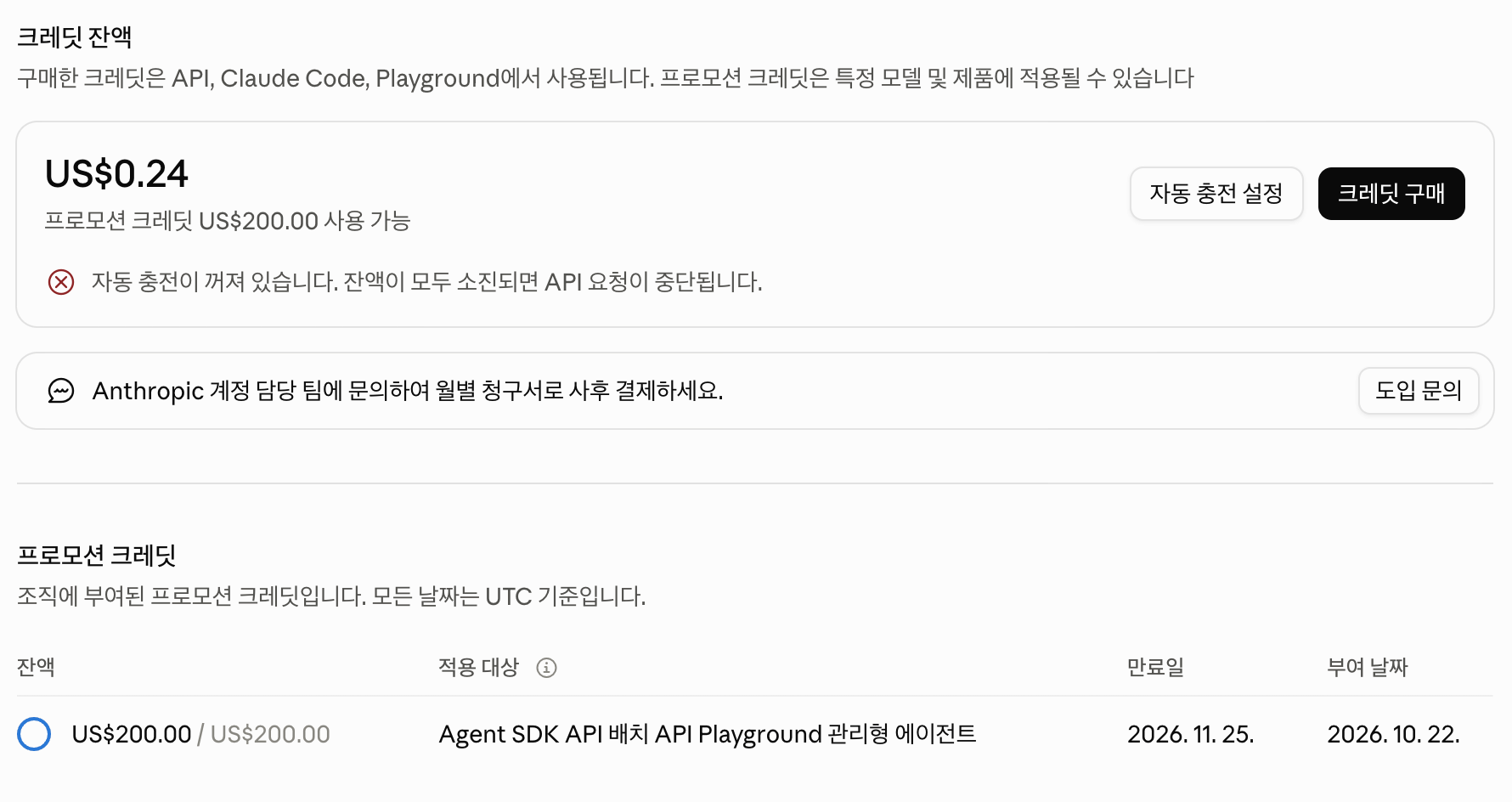
After linking, the Promotional credits table on the Console Billing page lists the remaining amount, what it applies to, its expiry time in UTC, and the grant date.
In the screenshot below, the column for what the credit applies to lists Agent SDK, API, Batch API, Playground, and Managed Agents. These are the products marked as covered in the table in section 2. The credit granted on 2026-10-22 expires on 2026-11-25.
5. Checking which organization a key belongs to
A call only counts toward the linked organization if it uses that organization's key. You can read a key's organization from the response headers of a model-list request, which does not consume tokens.
( source ~/.secrets/anthropic.env \
  && printf 'x-api-key: %s\nanthropic-version: 2023-06-01\n' "$ANTHROPIC_API_KEY" \
  | curl -s -o /dev/null -D - -H @- 'https://api.anthropic.com/v1/models?limit=1' \
  | grep -i -E '^HTTP|^anthropic-organization-id' )
HTTP/2 200 means the key is valid. The anthropic-organization-id header is the ID of the organization the key belongs to. Compare it with the Organization ID in the Console. If they match, the key belongs to the linked organization.
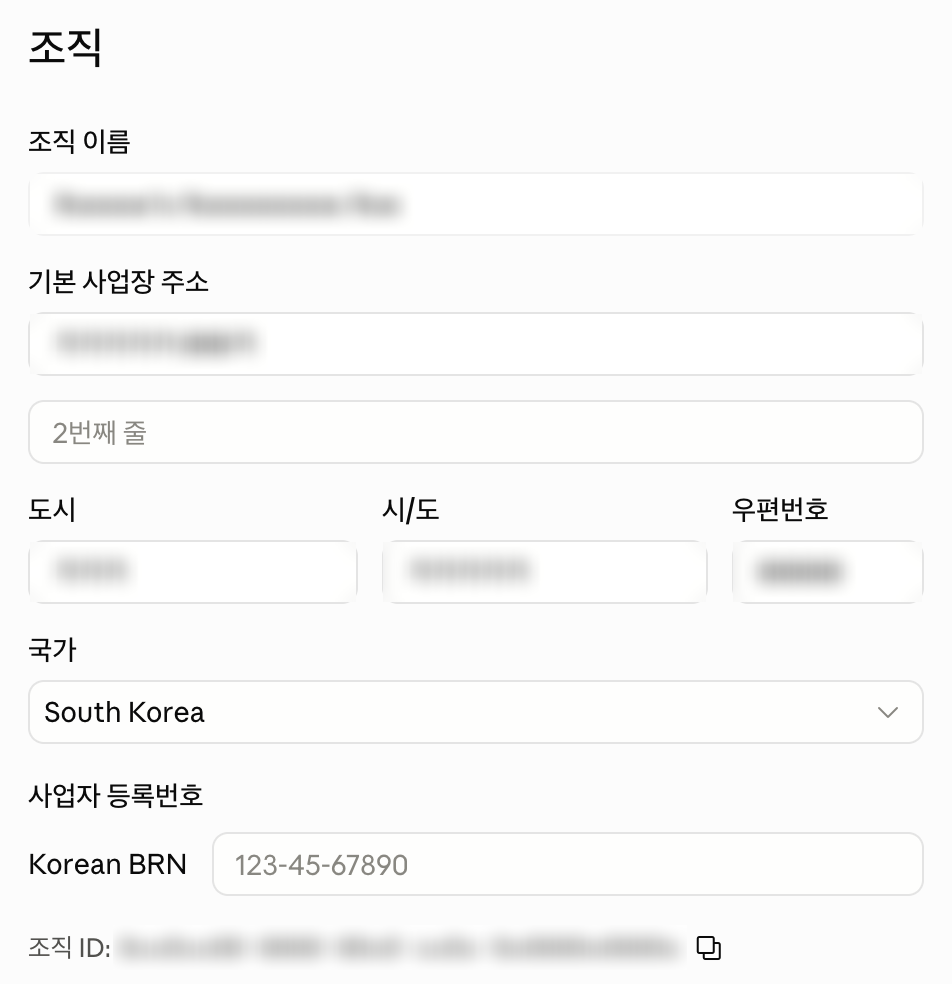
The Organization ID is near the bottom of Settings > Organization in the Console. The organization name, address, and ID are blurred below.
6. Why key handling is part of billing
Key handling decides which ledger a call hits. If you export ANTHROPIC_API_KEY in your shell, every process started from that shell can read it, including a Claude Code session. Claude Code can then authenticate with the API key rather than the subscription, and interactive usage starts landing in the API ledger without anyone intending it.
The commands in this guide therefore load the key only inside a subshell ( … ). They pass the header through standard input with -H @-, instead of putting the key in a command argument. Arguments can be visible to other users through process listings such as ps.
7. A minimal call and how to read the response
The Messages endpoint is POST /v1/messages. You send a model name, a maximum token count, and an array of messages.
( source ~/.secrets/anthropic.env \
  && printf 'x-api-key: %s\n' "$ANTHROPIC_API_KEY" \
  | curl -s https://api.anthropic.com/v1/messages -H @- \
      -H 'anthropic-version: 2023-06-01' -H 'content-type: application/json' \
      -d '{"model":"claude-haiku-5-5","max_tokens":1024,"messages":[{"role":"user","content":"hello"}]}' \
  | jq -r '.content[] | select(.type=="text") | .text' )
The run printed one line with the reply. In the response JSON, content is an array of blocks. Text blocks have type set to text, so select(.type=="text") keeps only those. A response that uses tools can include blocks of other types too.
The anthropic-version header pins the API version. Without it, a call can fail or return a shape you did not expect.
8. The same call through an SDK and a CLI
The Python SDK wraps the same request in an object call. The client reads ANTHROPIC_API_KEY from the environment, so the key never appears in your code.
# app.py
import anthropic

client = anthropic.Anthropic()  # reads ANTHROPIC_API_KEY from the environment

message = client.messages.create(
    model="claude-haiku-5-5",
    max_tokens=1024,
    messages=[{"role": "user", "content": "hello"}],
)
print(next(b.text for b in message.content if b.type == "text"))
( source ~/.secrets/anthropic.env && export ANTHROPIC_API_KEY \
  && uv run --no-project --with anthropic python app.py )
The export applies only inside this subshell, so the key does not leak into the rest of the shell. I ran this on 2026-10-22 and got the same reply.
The ant CLI is Anthropic's command-line tool. On macOS, install it with Homebrew.
brew install anthropics/tap/ant
( source ~/.secrets/anthropic.env && export ANTHROPIC_API_KEY \
  && ant messages create --model claude-haiku-5-5 --max-tokens 1024 \
       --message '{role: user, content: "hello"}' \
       --transform 'content.#(type=="text").text' -r )
--transform extracts a field from the JSON response. It suits shell scripts that need only one value. I ran this with ant 2.1.0 on 2026-10-22 and got the same reply.
9. The Batch API: asynchronous calls at half price
The Message Batches API accepts many requests at once and returns the results later. It fits bulk work that does not need real-time replies. Each request in a batch costs 50% of the standard price, and the credit applies to batches.
There are three constraints. A batch can hold up to 100,000 requests or 256 MB. Results become available when every request has finished or after 24 hours, whichever comes first. A request still unfinished after 24 hours expires and is not billed.
Give every request a custom_id. Results do not necessarily come back in request order, so custom_id is the key that matches each result to its request. In my runs, two identical batches returned their result lines in different orders.
# 1) Create the batch and keep the returned id (msgbatch_...)
BATCH_ID=$( ( source ~/.secrets/anthropic.env \
  && printf 'x-api-key: %s\nanthropic-version: 2023-06-01\ncontent-type: application/json\n' "$ANTHROPIC_API_KEY" \
  | curl -s -X POST https://api.anthropic.com/v1/messages/batches -H @- \
      -d '{"requests":[
            {"custom_id":"q1","params":{"model":"claude-haiku-5-5","max_tokens":64,"messages":[{"role":"user","content":"What is 1+1? Answer with the number only."}]}},
            {"custom_id":"q2","params":{"model":"claude-haiku-5-5","max_tokens":64,"messages":[{"role":"user","content":"What is the capital of Korea? Answer in one word."}]}}
          ]}' ) | jq -r .id )

# 2) Wait until processing_status is "ended"
for i in $(seq 1 40); do
  ST=$( ( source ~/.secrets/anthropic.env \
    && printf 'x-api-key: %s\nanthropic-version: 2023-06-01\n' "$ANTHROPIC_API_KEY" \
    | curl -s "https://api.anthropic.com/v1/messages/batches/$BATCH_ID" -H @- | jq -r .processing_status ) )
  [ "$ST" = ended ] && break
  sleep 10
done

# 3) Read the results. Each line is one request. Print the text, or the result type when a request did not succeed
( source ~/.secrets/anthropic.env \
  && printf 'x-api-key: %s\nanthropic-version: 2023-06-01\n' "$ANTHROPIC_API_KEY" \
  | curl -s "https://api.anthropic.com/v1/messages/batches/$BATCH_ID/results" -H @- \
  | jq -r '"\(.custom_id)\t\(.result.message.content[0].text // .result.type)"' )
I ran this on 2026-10-22. The batch finished in about two minutes. The results were q1 2 and q2 Seoul. The usage was 22 input tokens and 3 output tokens. At the Haiku 5.5 batch prices of 0.25 output per million tokens, that comes to (22 × 0.05 + 3 × 0.25) ÷ 1,000,000, about $0.0000019. I did not check the actual deduction in the Console.
10. Deduction, depletion, and the spend cap
Included credit is spent first, then purchased credit. Auto-reload looks only at the purchased balance. So a purchased balance can fall below the threshold and trigger a reload even while included credit remains.
When the credit runs out, API requests stop until the next grant. Those requests are not charged to the subscription; they return an error. The credit balance therefore works as a guard that is independent of the subscription usage limit.
The spend cap follows the calendar. It resets at 00:00 UTC on the first day of each month. Credit is granted on the billing cycle, so the two schedules can be out of step. Keep both in mind when you plan a month's work.
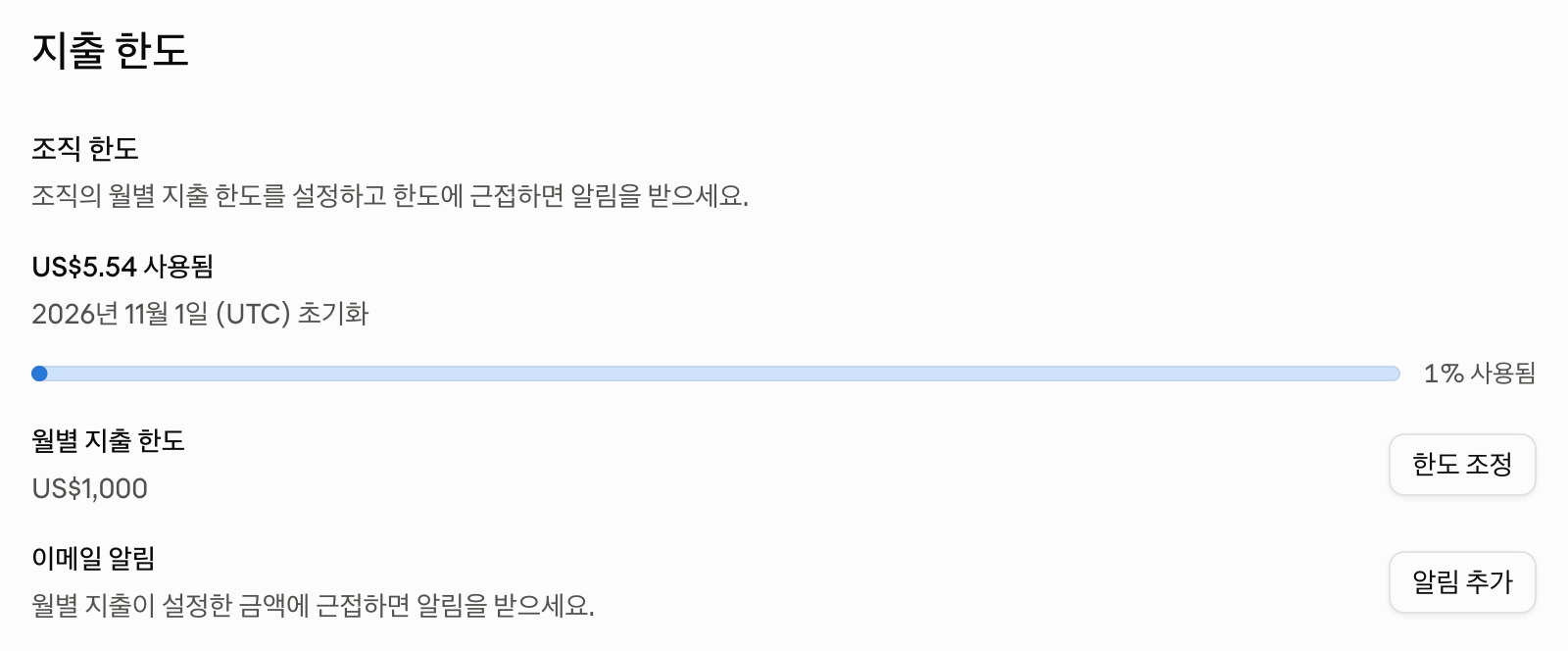
The Console Spend limits page shows this month's spend, the reset date, and the monthly limit. The organization below is on the Build tier (per the Rate limits page), and its monthly limit is US$1,000, the Build cap from section 3. The limit resets on 2026-11-01 (UTC), while the next credit arrives on 2026-11-24 according to the claude.ai screenshot in section 4.
11. Changing plans
| Change | Result |
|---|---|
| Cancel, switch to a plan that is not eligible, or get a refund | New grants stop when the plan ends. Credit already granted can be used until its expiry |
| Max 5x to Max 20x | The difference is prorated and granted at once, then $200 each cycle |
| Max to Team | The Max link ends. After the Team plan has been active for seven days, the Team Owner links again |
| Adding or removing Team seats | Additions apply from the next billing month. Removals apply at renewal. The $500 pool cap stays the same |
12. Understanding cost as structure
Token prices differ between input and output, and they also depend on caching. The official prices per million tokens as of 2026-10-23 are:
| Model | Input | Output |
|---|---|---|
| Opus 5.5 | $4 | $20 |
| Sonnet 5.5 | $2 | $10 |
| Haiku 5.5 | $0.10 | $0.50 |
Long context that repeats across calls costs less when sent through prompt caching. A cache read is 0.1 times the base input price, except on Opus 5.5 and Sonnet 5.5, where it is 0.05 times. A cache write costs 1.25 times the base input price with a 5-minute TTL and 2 times with a 1-hour TTL. Per million tokens, a cache read costs 0.10 on Sonnet 5.5, and $0.01 on Haiku 5.5.
Your choice of model usually matters more than anything else. Opus 5.5 costs 40 times as much as Haiku 5.5 for both input and output.
References
References · 6
- [1] API credits for Max and Team plans, Claude Platform Docs — platform.claude.com
- [2] Monthly API credits for Max and Team plans, Claude Help Center — support.claude.com
- [3] Supplemental Credit Terms, Anthropic — anthropic.com
- [4] Rate limits and spend limits, Claude Platform Docs — platform.claude.com
- [5] Pricing, Claude Platform Docs — platform.claude.com
- [6] Batch processing, Claude Platform Docs — platform.claude.com