AI / Agent
How Managed Agents Takes an Agent Apart: Brain, Hands, and Session
The design reasoning behind Anthropic splitting an agent into a session, a harness, and a sandbox, and what happens when you run all four parts of the official workshop repository: custom tools, multi-agent, memory, and file output
Part 2 described the bigger picture: model providers have added a layer that takes over the harness, the execution environment, and the session state. This post looks inside that layer. What did Managed Agents split an agent into, and what does that split look like in real calls?
In short, two effects of the split were confirmed directly by the runs in this post. When the client disappeared for 68 seconds, the session waited for an answer and resumed once the client reconnected, and changing the agent's configuration left already-open sessions on the version they were created with. Recovery from a dead container and the latency improvement are Anthropic's account, and I did not reproduce them here.
1. When one container holds everything
Anthropic's engineering post "Scaling Managed Agents: Decoupling the brain from the hands" (2026-04-08) is candid about where it started. At first, every component of an agent lived in a single container. The session (the conversation record), the harness (the loop that calls the model and handles tool calls), and the sandbox (the environment where code runs) shared one environment. That had advantages. File edits were direct system calls, and there were no service boundaries to design.
But that structure invited an old infrastructure problem. The post explains it with the pets-versus-cattle analogy from server operations. A pet is a named, hand-tended individual you cannot afford to lose, and cattle are interchangeable. With everything in one container, that container became a pet. When it died, the session was lost, and an unresponsive one had to be nursed back to health.
The post names three problems.
- It cannot be debugged. The only window in was the WebSocket event stream, and it could not tell whether a failure was a harness bug, a dropped packet, or a container going offline. To see what happened, an engineer had to open a shell inside a container that often held user data, which meant the team effectively could not debug.
- The harness assumes the work lives in the container. When a customer wanted Claude to reach resources in their own VPC, they had to peer their network with Anthropic's or run the harness in their own environment.
- There is no security boundary. Untrusted code that Claude generated ran in the same container as the credentials. A prompt injection only had to convince Claude to read its own environment.
The talk adds a point about how quickly harnesses go stale. Sonnet 4.5 tended to wrap up tasks early even with room left in its context window (called context anxiety), and the harness got a mitigation for it. On Opus 4.5 the behavior was gone and the mitigation was dead weight. A harness encodes assumptions about what the model cannot do on its own, and those assumptions age as models improve.
2. Splitting it into brain, hands, and session
The fix was to separate the parts. The post calls Claude and its harness the "brain," the sandboxes and tools the "hands," and the log of events the "session," and it describes making each an interface that assumes as little as possible about the others. The analogy comes from operating systems. An operating system virtualizes hardware into abstractions such as process and file, so read() behaves the same on a disk pack from the 1970s and on a modern SSD. Managed Agents virtualizes the components of an agent in the same spirit, so the implementation underneath can change while the interface on top stays put.
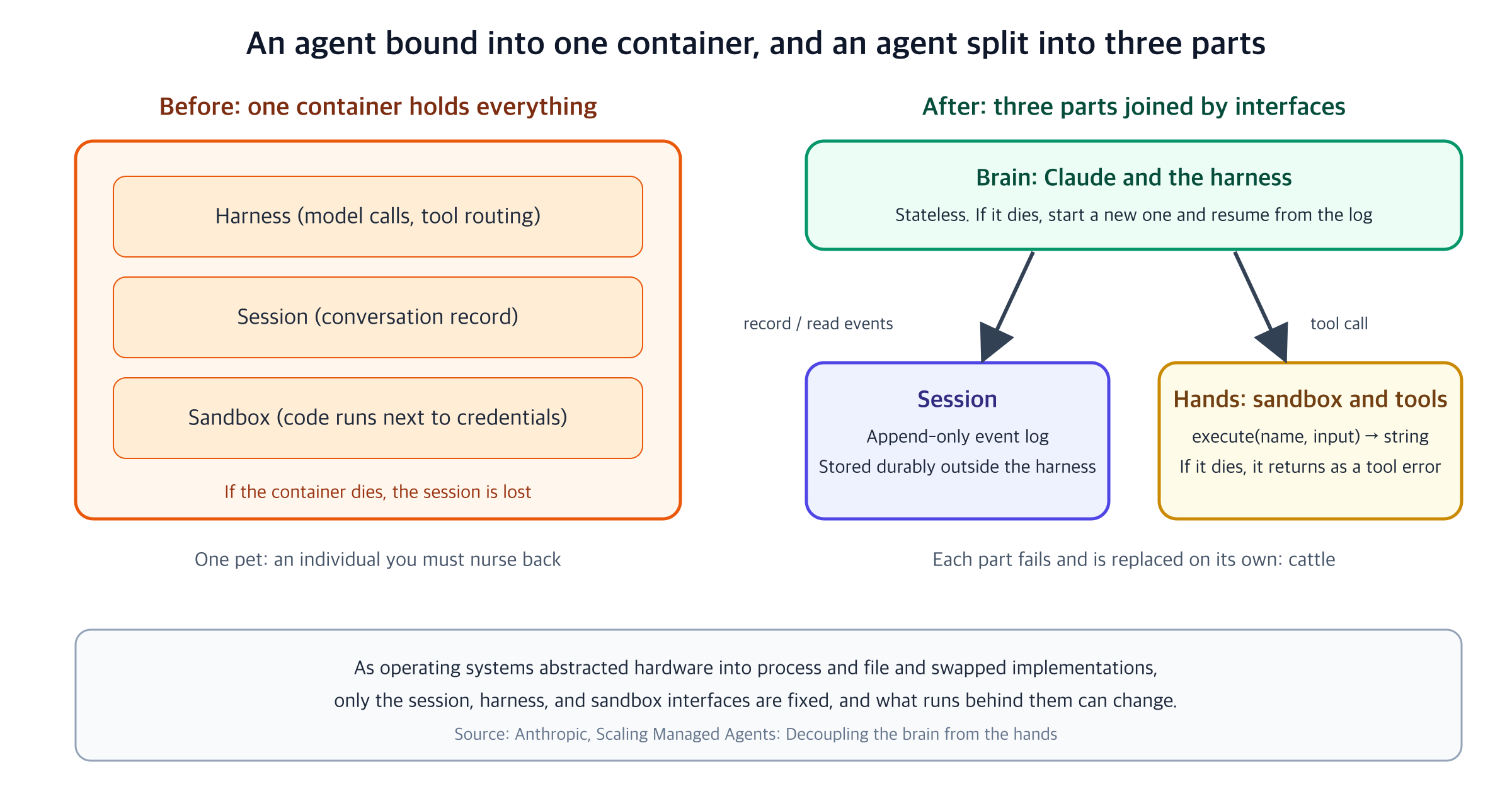
Here are the interface shapes the post describes. These names are the post's notation, not names of public API endpoints.
- Hands. The harness calls a container the way it calls any other tool:
execute(name, input) → string. If the container dies, the harness catches the failure as a tool-call error and passes it back to Claude. If Claude decides to retry, a new container is created from a standard recipe withprovision({resources}). The container becomes cattle. - Brain. Because the session log sits outside the harness, nothing in the harness has to survive a crash. When a harness fails, a new one is rebooted with
wake(sessionId), reads the log back withgetSession(id), and resumes from the last event. During the loop, the harness writes durable events withemitEvent(id, event). - Session. The session is not Claude's context window. It is an event object stored durably outside that window, and the brain reads positional slices of it through
getEvents(). Irreversible decisions such as compaction or context trimming belong to the harness. The session only guarantees that the original stays available however the harness transforms it.
The security boundary comes from the same separation. The post says the structural fix is to keep tokens unreachable from the sandbox where Claude's generated code runs. For Git, the repository's access token is used to clone during sandbox initialization and is wired into the local remote, so push and pull work without the agent handling the token. For MCP tools, OAuth tokens sit in a vault, Claude calls tools through a dedicated proxy, and the proxy fetches the credentials tied to the session and calls the external service. The harness never learns the credentials.
The post lists latency as a side effect. When the brain lives inside the container, no inference can start until that container is provisioned. After the split, a container is created through a tool call only when it is needed. Anthropic reports that time to first token (TTFT) dropped by about 60% at p50 and by more than 90% at p95. Those are Anthropic's internal measurements, and I did not reproduce them here.
The conclusion calls Managed Agents a meta-harness. It does not insist on a particular harness; it fixes only the interfaces: manipulate state (the session), perform computation (the sandbox), and scale to many brains and many hands. The post says Claude Code is one harness that could run on top.
3. What it looks like in the API
In the API, the split appears as three resources plus events. The Code with Claude London workshop talk "Ship your first managed agent" introduces them as the agent (persona and capabilities), the environment (the container where the agent's hands work), and the session (the run that ties them together). The agent loop runs on the server, and clients speak through sessions and events. The talk stresses one difference. The Messages API is tokens in, tokens out, request and response. A session works by appending events to a log, which is why an interrupted session can be resumed and its log observed.
The workshop adds these resources one at a time across four parts. The scenario is 2 a.m. at a fictional e-commerce shop, with three pages firing inside half an hour. Services named inventory, checkout, and cart are slow or throwing errors, and the agent finds the cause and writes a postmortem.
| Part | What it adds | Resources it shows |
|---|---|---|
| 1 | One agent, a runbook skill, custom tools | Agent, environment, session, events, skill, custom tool |
| 2 | An incident commander and investigators (multi-agent) | Coordinator, thread |
| 3 | Two memory stores (team history, the agent's notebook) | Memory store, memory version |
| 4 | File output (a postmortem PDF) | Skill, session outputs, Files API |
The data lives in two places. The log (74,164 lines in app.log, about 16 MB) is uploaded through the Files API and mounted into the session. Metrics, the deploy list, and commit diffs come from custom tools, which are Python functions on my own machine. The workshop deliberately splits the evidence so that the same root causes can be found through different paths.
4. Getting ready to run
The workshop repository is ship-your-first-managed-agent in anthropics/cwc-workshops (Apache-2.0). Its README is designed so that Claude Code fills in the empty functions in agent.py, and the person pastes in one prompt per part. In my run I filled in the same empty functions by hand, following the repository's stub comments. A reference implementation lives in solutions/agent.py, and check.py --solution runs it.
You need Python 3.10 or later and an API key. The repository pins anthropic==0.116.0 and streamlit==1.46.1. I ran it on 2026-10-24 with claude-opus-5-5. Managed Agents is in beta, so behavior may change.
git clone https://github.com/anthropics/cwc-workshops
cd cwc-workshops/ship-your-first-managed-agent
python data/generate_log.py    # writes data/app.log: 74,164 lines, 16,368,134 bytes
The data generator touches only local files and makes no network calls. The API key goes in .env. The repository assumes a workshop room that shares one key: every resource carries your handle (SRE_HANDLE) in its name and metadata, and the IDs of what you create are saved in .sre-state.json and reused on the next run. The cleanup script (cleanup.py) deletes only IDs recorded in that file, and only resources tagged with your handle.
Each part is verified with check.py against the live API. A check hands the agent one or three incidents, then looks for the correct commit in the reply and for a stop reason of end_turn.
python check.py --part 1 # check one part at a time; --part 4 includes the earlier parts
5. Part 1: an agent whose hands stay on your machine
The core of Part 1 is to create one agent, attach an environment, a file, and a skill, and run some tools on your own machine. The repository's setup looks like this.
# Environment: where the agent's container runs. No network restrictions
config = {"type": "cloud", "networking": {"type": "unrestricted"}}
client.beta.environments.create(name=..., config=config, metadata=...)

# Session: ties the agent and the environment together and mounts the uploaded log
client.beta.sessions.create(
    agent=agent_id,
    environment_id=env_id,
    resources=[{"type": "file", "file_id": log_file_id, "mount_path": "app.log"}],
)
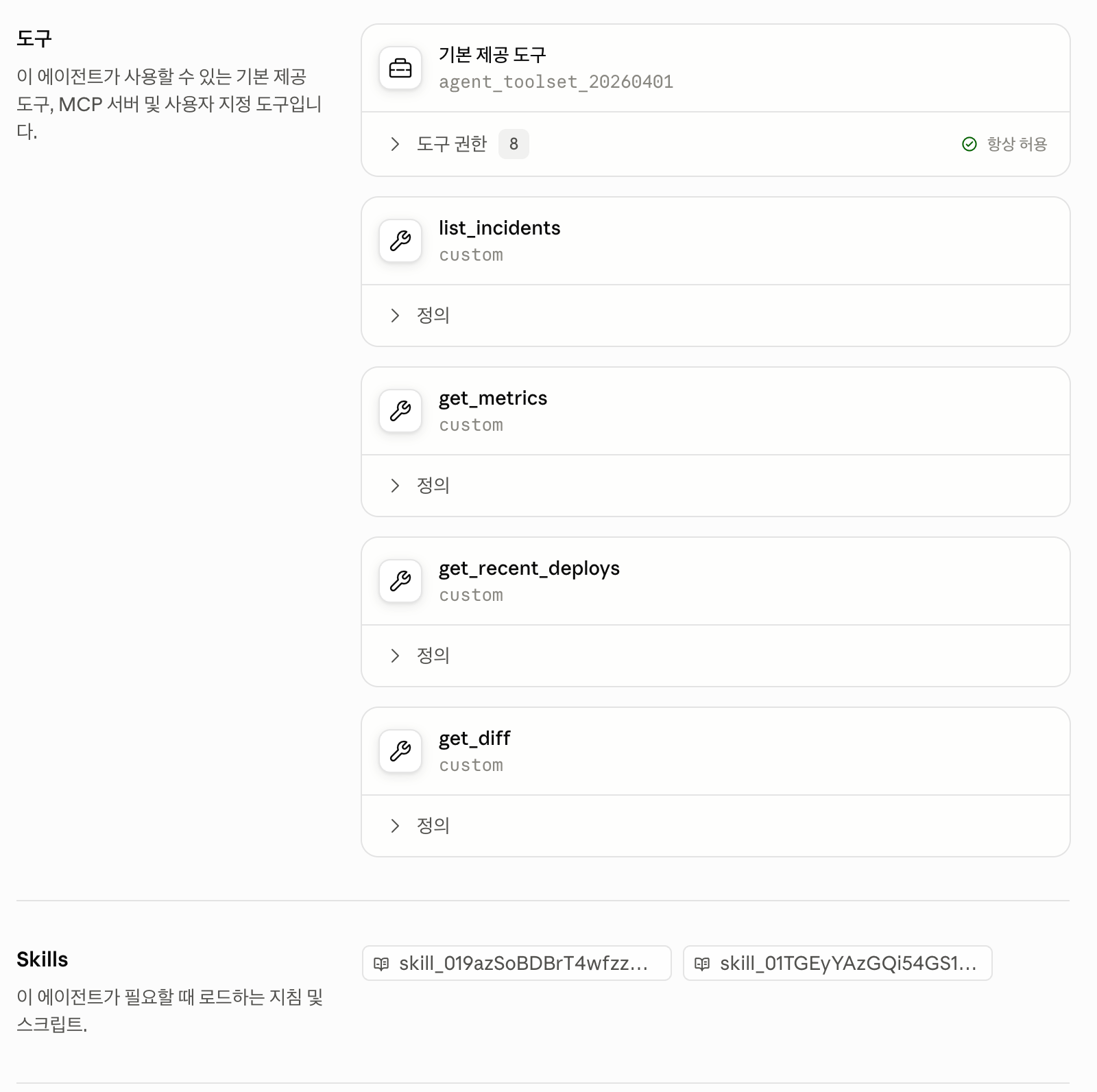
The agent's tool list mixes two kinds. One is {"type": "agent_toolset_20260401"}, the bundle of built-in tools such as shell, files, and search. The other is "type": "custom", used to define list_incidents, get_metrics, get_recent_deploys, and get_diff. For these, only the name, description, and input schema are registered on the server. The code itself lives on my machine.
Opening the commander agent in the Console shows both kinds side by side. The four custom tools appear as custom below the built-in toolset, and the Skills section lists the attached skills by ID. The screenshot is the latest version (v5), saved after Part 4, so it has two skills. The Console screenshots in this post show the Korean UI.
The runbook is attached as a skill: a folder containing a SKILL.md that the agent reads when it needs it. The first thing the agent did in my run was read /workspace/skills/incident-triage-runbook/SKILL.md with the sandbox read tool. The runbook says to look at deploys first and not to open the log first, and the agent followed that order. It requested deploys and metrics first and only then read the log with bash.
The custom tool round trip
When the agent calls a custom tool, the session waits for the client's answer. The repository's stream loop handles that round trip like this.
with client.beta.sessions.events.stream(session_id) as stream:
    client.beta.sessions.events.send(session_id, events=[
        {"type": "user.message", "content": [{"type": "text", "text": user_text}]}])
    for ev in stream:
        yield ev
        if ev.type == "agent.custom_tool_use":
            client.beta.sessions.events.send(session_id, events=[{
                "type": "user.custom_tool_result",
                "custom_tool_use_id": ev.id,
                "content": [{"type": "text", "text": handle_tool(ev.name, ev.input)}]}])
        elif ev.type == "session.status_terminated":
            return
        elif ev.type == "session.status_idle" and ev.stop_reason.type != "requires_action":
            return
The stream is opened before the message is sent, so no event from this turn is missed. Note that the loop does not treat session.status_idle as the end by itself; it checks stop_reason. An idle session whose reason is requires_action does not mean "the work is done." It means "waiting for your answer."
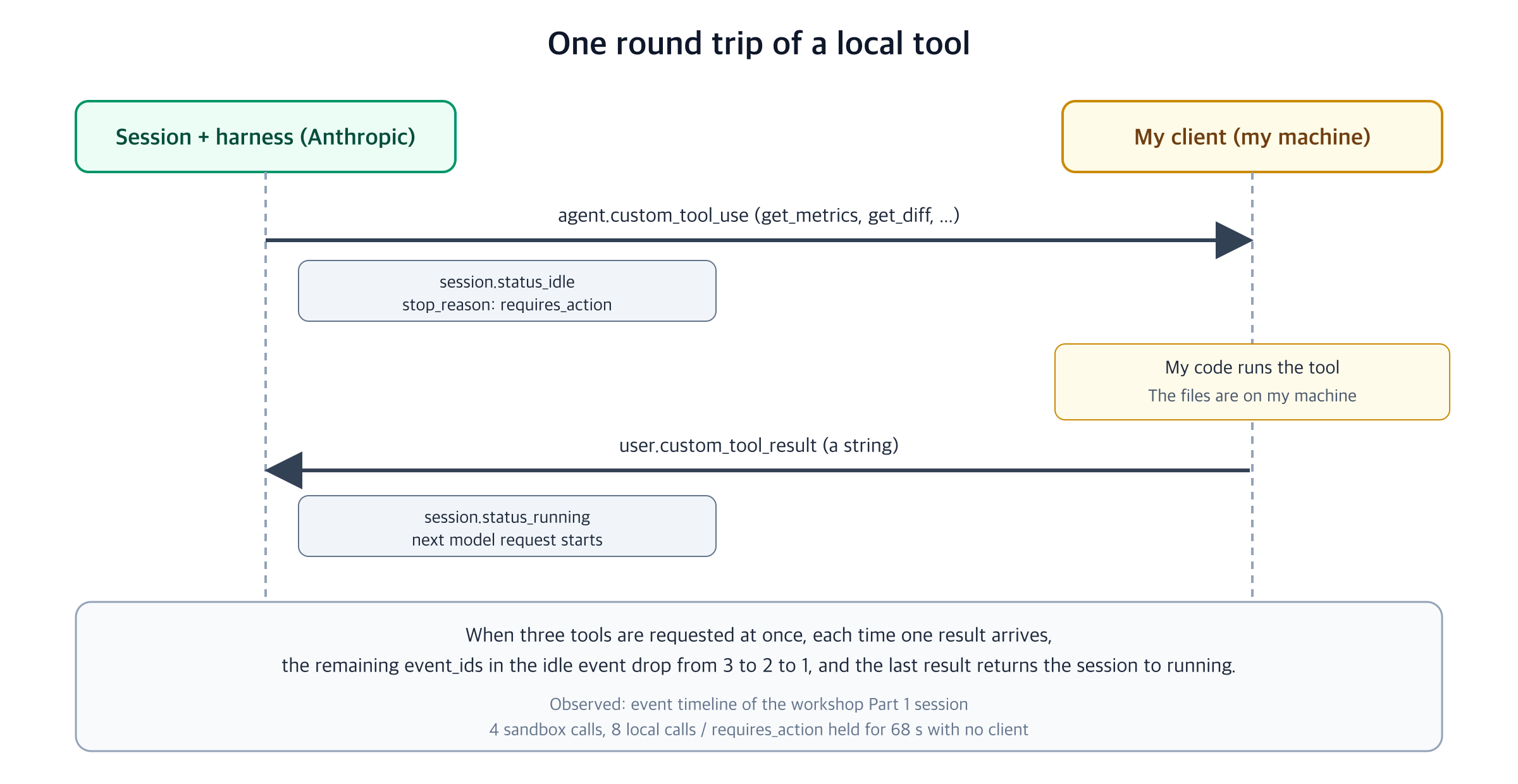
The session's event timeline showed this round trip exactly. When the agent requested three tools at once (get_recent_deploys, get_metrics, list_incidents), the session emitted session.status_idle with requires_action, and that event carried three unanswered call IDs. Each time the client sent one result, the remaining IDs in the idle event went from 3 to 2 to 1. When the last result arrived, the session returned to session.status_running and the next model request began.
The Part 1 check passed in 49 seconds, and the agent named the correct commit, a3f9c21. Tool calls ran 4 times in the sandbox (read 1, bash 3) and 8 times on my machine (get_metrics 3, list_incidents 2, get_diff 2, get_recent_deploys 1). The metrics, deploys, and diffs were read from files on my machine and reached the server only as tool-result strings. The only file uploaded to the server was the log, and everything else the model saw came back through tool results. The session's list_cost was "20", or 20 cents, with 48.1 seconds of active time.
6. When the client disappears, the session waits
With part of the hands on my machine, a natural question follows. What happens to the session if my process disappears before sending a tool result? By the design post's reasoning, the harness is stateless and the session log is durable, so the session should survive. I checked.
# 1) Send the message without opening a stream: the client sends, then goes away
client.beta.sessions.events.send(sid, events=[{"type": "user.message", "content": [
    {"type": "text", "text": "Use only the list_incidents tool, then tell me in one sentence how many pages are open."}]}])

# 2) Poll 12 times at 5-second intervals: session status, and custom tool calls with no answer
events = list(client.beta.sessions.events.list(sid, order="asc", limit=1000))
answered = {e.custom_tool_use_id for e in events if e.type == "user.custom_tool_result"}
pending = [e for e in events if e.type == "agent.custom_tool_use" and e.id not in answered]

# 3) Reconnect after 68 seconds: answer the pending call and read the stream to the end
All 12 polls gave the same result. The session status was idle, one custom tool call (list_incidents) was unanswered, and the last idle's stop_reason was requires_action. None of it changed for 68 seconds. After 68 seconds I reconnected and sent the result for the pending call. The same session resumed and finished in 2.9 seconds with end_turn, answering that three pages were open.
The experiment shows exactly this much. With no client present, the session did not disappear. It stayed in a state waiting for the answer, and it resumed on reconnection. I observed the wait only up to 68 seconds and did not find out where the limit is. I did not run the case where a container is killed on purpose to see whether it recovers. That part remains the design post's explanation.
7. When the container appears
The design post names "create containers only when needed" as an effect of separating brain from hands. The place where you can observe this is right after a session is created. I used a claude-haiku-5-5 agent with only the default tools and measured two things. First, how quickly a short turn that needs no tools finishes right after session creation. Second, how old the container is when the first command inside the sandbox runs. I read the container's age from the elapsed time of PID 1 (ps -o etimes= -p 1), run through the bash tool.
| Measurement | Value |
|---|---|
| Session creation call | 0.54 s, 0.76 s |
| Turn with no tools, right after creation | First event 0.84 s, first text 1.47 s, total 1.62 s |
| Turn with no tools, 40 s after creation | First text 2.9 s |
| First sandbox command, right after creation | Tool call at 1.62 s, result at 3.42 s, PID 1 age 4 s |
| First sandbox command, 40 s after creation | PID 1 age 47 s |
| Second sandbox command, 30 s later | Same PID 1 start time, age 82 s |
Three things can be read from this. First, the first turn that needed no tools did not wait for a container. The answer finished 1.6 seconds after the session was created. Second, the sandbox had a PID 1 age that matched the time since session creation: 4 seconds at the first command right after creation, and 47 seconds 40 seconds later. In this run, the container had already started before the first tool call. Third, the same session's sandbox persisted between turns. The PID 1 start time was the same for both calls.
This observation does not match the design post's description that containers are created only on a tool call. Two cautions apply, though. PID 1's age is a process time inside the container, so an implementation that pulls a container from a pre-warmed pool could produce the same values. And this measurement used a Haiku agent and a trivial prompt, so it does not match the conditions behind the p50 and p95 TTFT figures Anthropic reports. What is solid is that a first turn needing no tools was not blocked on container readiness.
8. Agents have versions
How a session treats configuration shows up most clearly in agent versions. The workshop creates an agent and, when the configuration changes, updates it to a new version of the same agent. The repository's helper stores a hash of the configuration and calls agents.update only when it has changed.
client.beta.agents.update(
    agent_id,
    version=client.beta.agents.retrieve(agent_id).version,   # optimistic locking: send the current version
    **config)
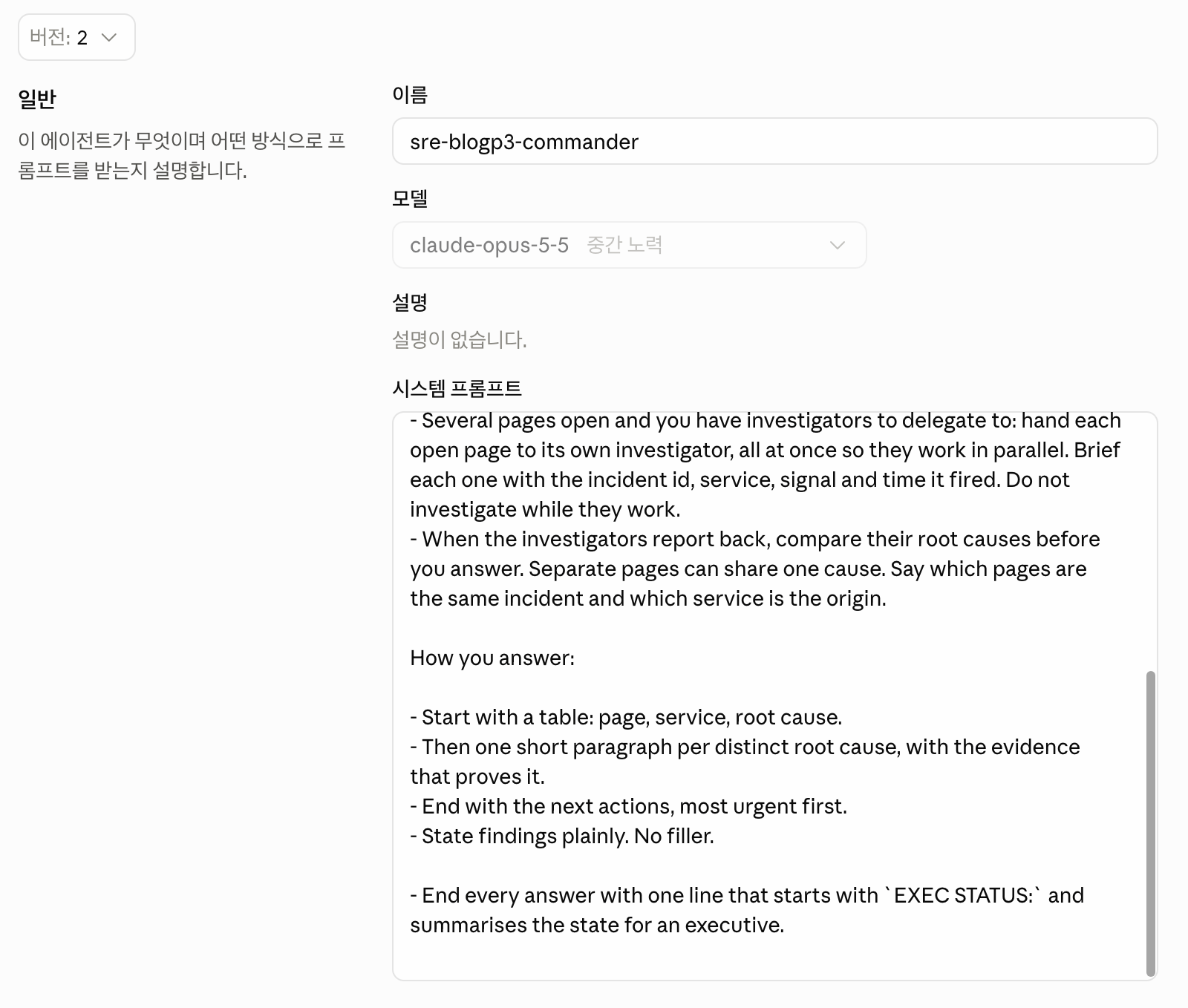
The README suggests an optional exercise: have the commander end every answer with a one-line executive status. It says that when you start a new session, "the agent ID stays the same; you just published version 2." I checked what that statement covers. I added one line to the system prompt, re-saved the agent, and compared three things.
| Target | Result |
|---|---|
| The agent | Went from version 1 to version 2 |
| The existing session (created on version 1) | Stayed pinned to version 1 after the agent became version 2. Asked the same question again, it did not pick up the added instruction |
| A new session | Started on version 2. The EXEC STATUS: line I added appeared at the end of the reply |
| A session with a pinned version | Created with agent={"type": "agent", "id": ..., "version": 1}, it started on version 1 even though it was not the latest |
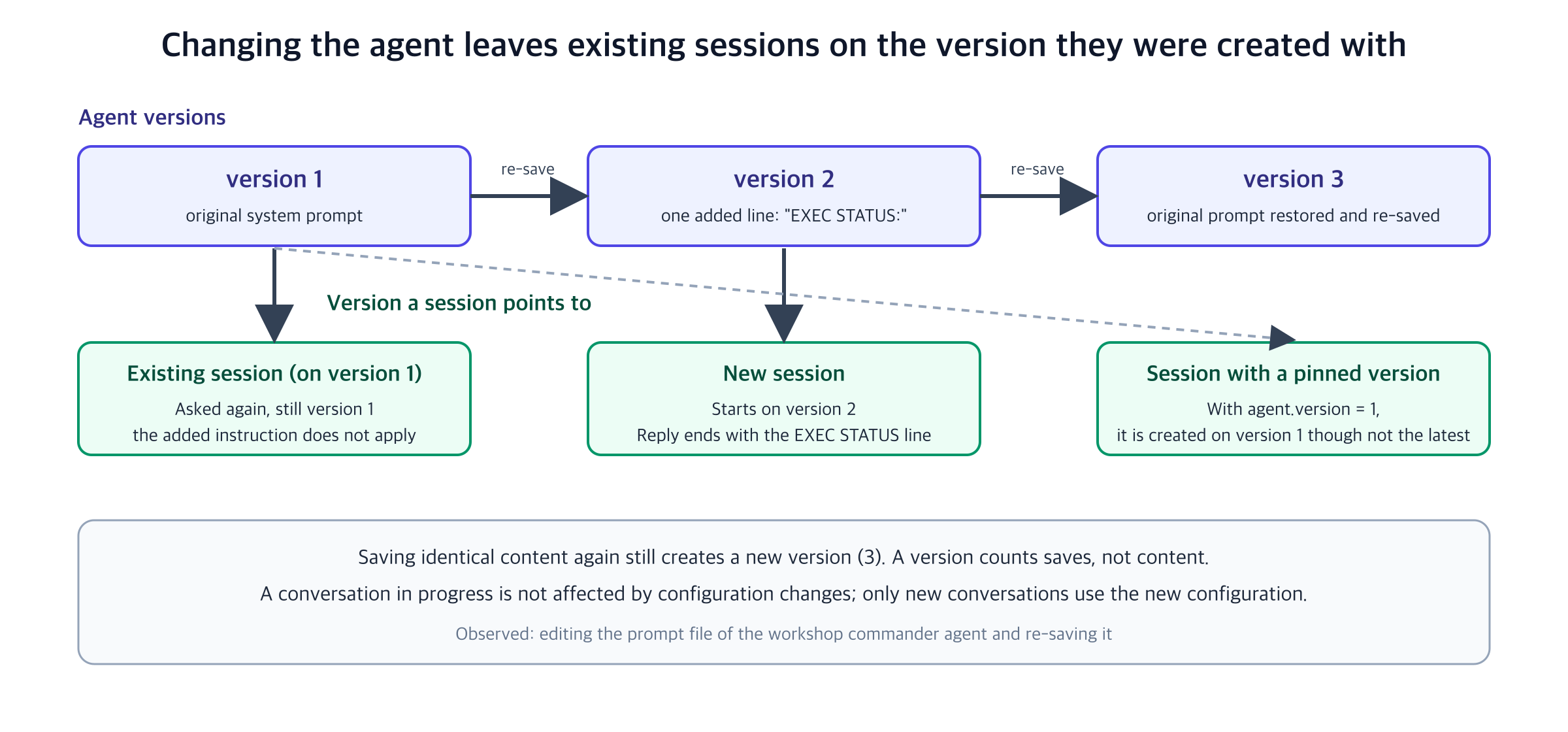
When I restored the prompt and re-saved, a version 3 appeared. Even with identical content, every save raises the version, so a version counts saves, not content.
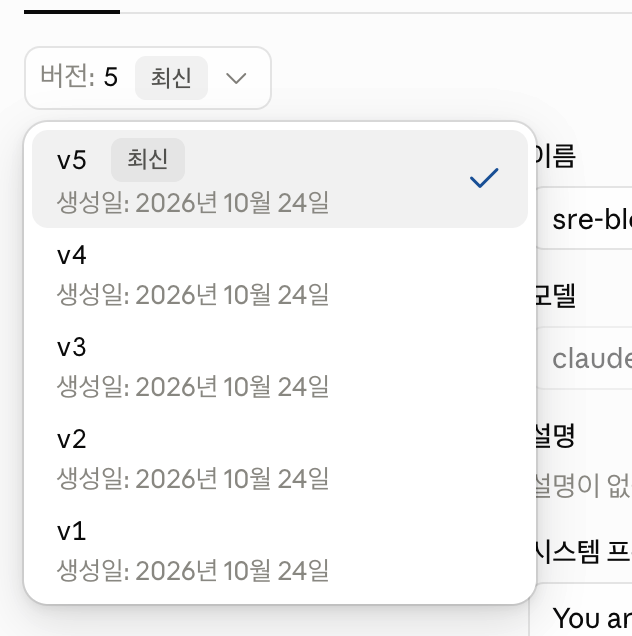
The Console keeps this history. The commander's version menu lists v1 through v5. v4 was saved when the investigator roster from section 9 was added, and v5 when the second skill from section 11 was added.
Choosing a version opens that version's configuration. The system prompt of v2 ends with the EXEC STATUS: line added in this experiment. v1 and v3 do not have that line.
What this behavior means shows up in operations. Changing an agent's configuration does not contaminate a conversation in progress, and only new conversations use the new configuration. If you pin a version when you create a session, you can reproduce a particular conversation on the old configuration even after newer versions exist. The flip side is that a prompt change does not apply to sessions that are already open, so you must confirm a change with a new session. There is one more trap of the same kind. The workshop's provided.py reads the prompt file once, when the module loads. If you edit the file while a process is running and do not reload the module, the agent configuration does not change, so agents.update is not called and the version does not rise.
9. Part 2: a coordinator and threads
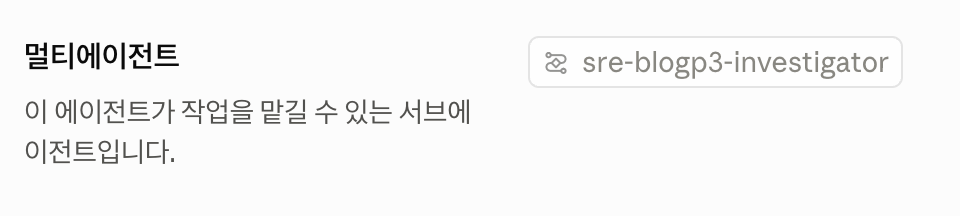
One agent is enough for one incident, but when three pages fire at once you need a team. Part 2 creates a second agent, the investigator, and lists it on the commander's roster.
multiagent={
    "type": "coordinator",
    "agents": [{"type": "agent", "id": investigator_id, "version": state.version("investigator")}],
}
Pinning the investigator's version in the roster connects back to the previous section. If you change the investigator, the commander's configuration changes too, so the commander is saved again, and the commander's new version points to the new investigator. A sub-agent can use only the tools in its own configuration, so the investigator needs the same tool list.
In the commander's configuration in the Console, this roster appears as a sub-agent in the multi-agent section.
Given the single instruction "Three pages are open. Run the incident," the commander opened one investigator thread per page. Four threads appeared inside one session: the commander's primary thread and three investigators. Each thread has its own agent snapshot, model, status, usage, and statistics. The threads share one container but keep separate contexts.
Three new kinds of events showed up in the stream. session.thread_created marks a new thread. agent.thread_message_sent marks the commander handing work to an investigator, and agent.thread_message_received marks an investigator reporting back. An investigator's tool calls arrive in the same session stream with a session_thread_id attached. That is why the stream loop from Part 1 works unchanged. When an investigator makes a custom tool request, you send the result the same way, and the server routes it by ID. In this run, custom tools were called 37 times, 25 of them get_metrics, and sandbox tools only 2 times. The client returned results immediately, so the total wait between calls was 0.3 seconds.
The Part 2 check passed in 107 seconds. The three threads found a3f9c21 and c81d4e7, and the report tied cart to checkout as a symptom. That matches the answer table in the README. For inventory, a deploy that removed a cache is the cause. For checkout, a deploy that turned one batched query into a query per order (N+1) is the cause. Cart had no deploy, and its errors were a symptom of checkout saturating the shared database. Three pages, two root causes.
Cost and time are recorded per thread.
| Thread | Active time | list_cost | Output tokens |
|---|---|---|---|
| Commander (primary) | 53.5 s | 21 cents | 4,682 |
| Investigator 1 | 67.3 s | 27 cents | 4,986 |
| Investigator 2 | 63.8 s | 31 cents | 5,956 |
| Investigator 3 | 61.6 s | 32 cents | 5,783 |
| Sum of threads | 246.1 s | 111 cents | 21,407 |
| Whole session | 106.0 s active, about 120 s wall clock | 113 cents | 21,407 |
The sum of the threads' active time (246 seconds) is about double the wall-clock time (about 120 seconds) because the three investigators ran in parallel. Multi-agent reduces time, not cost. Each thread calls the model on its own context, so cost adds up with the number of threads. The session's usage.active_seconds is closer to wall-clock time, while the sum of the thread statistics adds up thread time. I could not find a documented definition of either value, and I could not find out why the sum of thread costs (111 cents) is 2 cents below the session's list_cost (113 cents).
Part 1 (one incident, 49 seconds, 20 cents) and Part 2 (three incidents, 107 seconds, 113 cents) are not the same task, so I do not compare their speed or cost directly.
10. Part 3: memory stores
Sessions share nothing with each other. If you give a new session the same three pages after Part 2, it repeats all the investigation from scratch. Part 3 solves this with two memory stores. One is team history, curated by humans and read-only. The other is the agent's own notebook, readable and writable. Both are mounted when the session is created.
{"type": "memory_store", "memory_store_id": team_history, "access": "read_only",
 "instructions": "Team knowledge. Read service-map.md and known-noise.md before you investigate, ..."},
{"type": "memory_store", "memory_store_id": notebook, "access": "read_write",
 "instructions": "Your own notebook. Check it first for incidents you have already worked. "
                 "When an investigation concludes, save a short note at /incidents/<date>-<INCIDENT_ID>.md: ..."},
instructions is text the model reads, and it is the only thing that tells the agent what each store is for. The repository's comments warn about the same point: if the notebook instructions never say to write, the agent never will. Memory attaches only when a session is created, so after you add a store you need a new session.
Inside the container, a store appears as a folder under /mnt/memory/<store name>/. The agent browses with glob and read and writes notes with write and edit. In the first session, after finishing the investigation, the agent wrote /incidents/2026-04-22-INC-2276.md and /incidents/2026-04-22-INC-2277.md to the notebook, and the Part 3 check passed in 117 seconds.
Memory files keep a version history. Each change carries the kind of operation (created, modified) and the ID of the session that made it. You can trace which session wrote a note and when it was edited.
I gave a new session the same three pages once more and compared.
| Item | First session | Second session (notebook has 2 notes) |
|---|---|---|
| Reading the notebook | No notes yet | Within 8 seconds, read 2 notebook notes and 3 team-history files |
| Investigator threads | 3 | 3 |
| Duration (by events) | 116 s | 123 s |
list_cost | 116 cents | 111 cents |
| Note changes | 2 notes created | The 2 existing notes edited with "re-verified" content |
In this run, memory did not improve speed or cost. The agent read the notes first and still sent three investigators back out to check, then appended re-verification results to the notes. The README says the agent sometimes answers straight from the notes in under a minute and sometimes sends the investigators back out to re-check what the notes say, and this run was the latter. It is a single comparison, so I cannot know the variance, and I cannot generalize the effect of memory. What this run shows is only that reading a note and trusting a note are different behaviors. My interpretation is that the store's instructions likely decide how far the agent trusts a note, but I did not change the instructions and compare.
11. Part 4: file output
The last part gets a postmortem report as a PDF. You attach a second skill, postmortem-report, and the skill body says only what the report must contain. The agent writes Python in its own sandbox and builds the PDF itself. There is no template.
The path for receiving the output is the one from Part 2 of this series. Files the agent writes to /mnt/session/outputs/ appear in the Files API, scoped to the session.
files = client.beta.files.list(scope_id=session_id, betas=["managed-agents-2026-04-01"])
return [(f.filename, client.beta.files.download(f.id).read()) for f in files if wanted_output(f)]
wanted_output keeps only files with a PDF or PNG extension and a size of 20 MB or less, and it reduces file names to a plain base name with path separators stripped. The names come from the agent's container, so the code does not trust them as given.
The agent read the skill, read the team's postmortem conventions, read the structured findings the investigators left in /workspace/findings, and then wrote and ran a Python script that computes the chart values from the log. There were 9 sandbox tool calls, and the last turn took 109 seconds. In the middle, the agent also posted a message noting that "the log-derived checkout p99 peak (5,295 ms) is higher than the dashboard's 3,640 ms" and saying how it would label the chart; that message is in the events.
The downloaded file was 71,519 bytes with a %PDF-1.4 header, four pages at letter size. Page 1, which I opened, held a summary, a table of pages with their causes and roles, the impact, and "why two incidents, not one," and it matched the answer. Inventory's cause was c81d4e7, checkout's cause was a3f9c21, and cart was a symptom of checkout.
The session that verified this part ran the investigation turn (147 seconds) and the PDF turn (109 seconds) back to back, for a total cost of 149 cents and 254 seconds of active time.
12. What you can see inside the sandbox
The design post's security claim is that credentials should not be reachable from the sandbox where code runs. I cannot fully verify that claim with my own calls, but I can look at the names of environment variables inside the sandbox. I ran env | cut -d= -f1 through the bash tool. I did not read any values, only the names.
The list included paths for development tools (HOME, PATH, JAVA_HOME, NVM_DIR, RBENV_ROOT, RUSTUP_HOME, PLAYWRIGHT_BROWSERS_PATH, and others), certificate paths (SSL_CERT_FILE, REQUESTS_CA_BUNDLE, NODE_EXTRA_CA_CERTS), and IS_SANDBOX, SBX_TELEMETRY_SOCKET, ANTHROPIC_COMMIT_SIGN_URL, and ANTHROPIC_COMMIT_TOKEN. The caller's key (ANTHROPIC_API_KEY or an auth token name) was not in the list.
What this result says is narrow. That the caller's key was not passed in as a sandbox environment variable does not contradict the design post. But a variable named ANTHROPIC_COMMIT_TOKEN shows that some token can exist inside the sandbox, and I did not check what its value is or how far it reaches. A list of names cannot prove isolation. The values and their permission scope decide where the boundary sits.
13. What the decomposition means
From here on, this is my interpretation. I read the heart of this design as treating the harness as a replaceable part, not a fixed product. That is why the engineering post cites the context-anxiety case. A harness is built from assumptions about a model's limits, and when the model changes, those assumptions become a burden. With the session, harness, and sandbox behind interfaces, you can swap the harness and the session record stays, and you can swap the sandbox and the harness still runs.
Two things were directly supported by this run. One is that the session state stayed and resumed on reconnection even when the client, one part of the hands, was gone for 68 seconds. The other is that a session is tied to the agent version it was created on, so a configuration change leaves a conversation in progress alone. Recovery from a container failure and the latency improvement remain at the level of the design post's explanation.
What a developer gains is clear. Failures stay inside a part, configuration changes do not bleed into conversations, and you choose where the hands live: a cloud container, a function on your machine, or customer infrastructure. In this post, the metrics and deploy data stayed as files on my machine and reached the model only as tool-result strings, which is one example.
There are costs too. You have to learn resources such as sessions, threads, memory versions, and agent versions, and cost is spread across threads, sessions, and the harness's fixed input, so no single number shows it. In the multi-agent session, the sum of thread costs and the session cost differed by 2 cents. To know what one request actually spent, you have to read the usage object and the thread statistics together.
14. Running it yourself
The order is simple. Get the repository, generate the log with generate_log.py, put the key in .env, fill in the empty functions in agent.py, and verify each part with check.py. If you run all four parts, your account ends up holding one environment, two agents, two skills, two memory stores, one uploaded file, and several sessions. When you finish, check the targets with python cleanup.py --dry-run and remove them with python cleanup.py. The cleanup deletes sessions, files, skills, memory stores, and the environment, and it archives the agents, which cannot be deleted.
Here is the cost range from this run. With the default settings (both the commander and the investigators on claude-opus-5-5), Part 1 cost 20 cents, Part 2 cost 113 cents, Part 3 cost 116 cents (the second session, with memory already in place, cost 111 cents), and the investigation and PDF turns of Part 4 cost 149 cents. The five sessions add up to about $5.09. The README says setting the investigators to claude-haiku-5-5 is faster and cheaper, but I did not run that configuration.
For a room that shares one key, the repository does two things. It puts your handle on every resource so names do not collide, and its cleanup script touches only resources tagged with your handle. A shared key is still a shared key, so the README advises using a key created in a workshop-only workspace with a spend limit, and deleting it afterward. The repository is Apache-2.0 but is an unmaintained workshop sample.
References
- Scaling Managed Agents: Decoupling the brain from the hands, Anthropic[1]
- Ship your first managed agent, Code with Claude London workshop talk (Anthropic Applied AI team)
- anthropics/cwc-workshops, ship-your-first-managed-agent, GitHub[2]
- Claude Managed Agents overview, Claude Platform Docs[3]
- Managed Agents files, Claude Platform Docs[4]
- Model Providers Are Taking Over the Agent Runtime: Managed Agents and the OpenAI Agents API, Part 2
References · 4
- [1] Scaling Managed Agents: Decoupling the brain from the hands, Anthropic — anthropic.com
- [2] anthropics/cwc-workshops, ship-your-first-managed-agent, GitHub — github.com
- [3] Claude Managed Agents overview, Claude Platform Docs — platform.claude.com
- [4] Managed Agents files, Claude Platform Docs — platform.claude.com